
glossary
Path
A path is a line drawn down the middle of a run, plus a width, that the program later fattens into a ribbon.
Long wires, board traces, and light guides are faster to edit as a spine than as twenty corners. Change the width once and the whole run updates. Change a bend and the fattened outline follows. When a mask is required, the shop still wants a filled outline, so the path is a friendly way to store work that will become a polygon. Select a snake of metal and the editor shows one thin centerline with a number such as 0.4 micrometers beside it. The colored band on screen is that width painted around the spine, often with square or rounded ends.
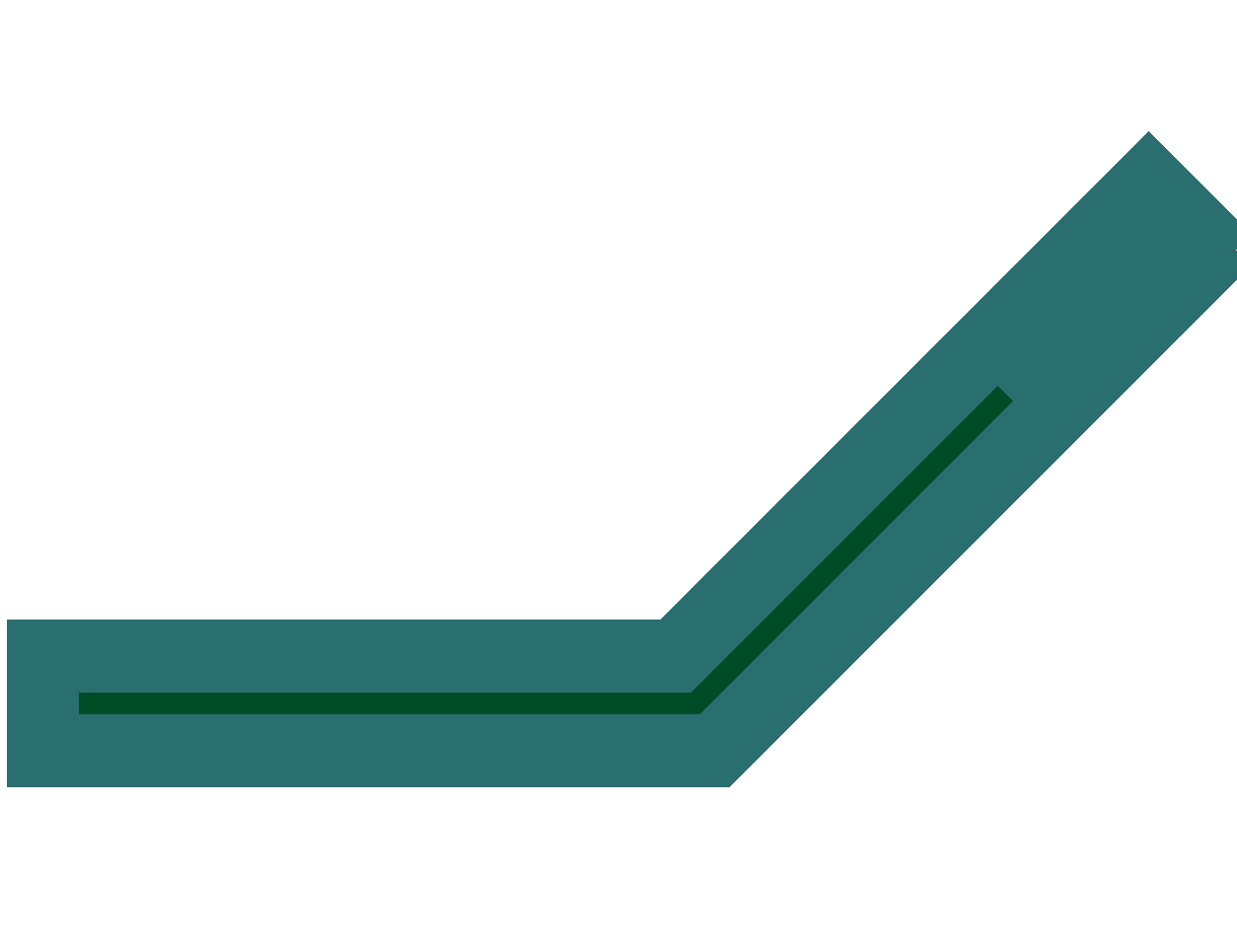
The thin line is the centerline the file stores. The ribbon is wider and runs past the end of that line.
Ends matter. A path can stop flush with the last point, extend by half a width, or grow a rounded cap. Those choices change how two ribbons meet at a T. A four-sided stand-in for a short run is a box. How wide the ribbon is, and how far it stays from its neighbor, are width and spacing rules. The centerline is not the metal. The metal is the band. Measuring from spine to spine understates the gap by a full width. The ribbon itself is drawn in paths: centerlines with width, and the loop the mask shop actually writes is a polygon. The gap you owe the neighbor is settled in width and space.